
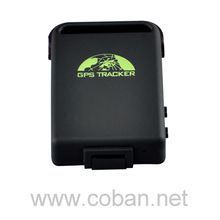


The Coban TK102 GPS tracker is a versatile and reliable device that can be used for a variety of purposes. Whether you need to protect your vehicle against theft, keep an eye on your child, elderly or disabled loved ones, manage your personnel, or track criminals discreetly, this tracker has got you covered.
Working based on the existing GSM/GPRS network and GPS satellites, the Coban TK102 can accurately locate and monitor any remote target. You can easily track the device using SMS, a computer, or a PDA. The tracker offers a wide range of features to ensure the safety and security of your assets and loved ones.
Some of the outstanding features of the Coban TK102 include:
- Change the password
- Authorization
- Single Locating
- Auto Track
- Absolute street address
- GPS drift suppression
- Location based service (LBS)
- Monitor (Voice Surveillance)
- Data logging
- Data Load
- Shock Sensor Alarm
- Geo-fence
- Movement alert
- Overspeed alert
- SOS alert
- Low battery alert
- GPS blind Spot alert
- Sleep Mode
- Sleep by time
- Sleep by shock sensor
- Deep Sleep by Shock Sensor
- Start Work on specific time
- No sleep mode
- Forward the third parties' message
- Charges Inquiry
- State Checking
- IMEI checking
- Terminal (local) Time
- TCP/UDP switch
- Reset
- Configure parameters by USB
- GPRS setting
- Less GPRS traffic
- Modes switch between SMS and GPRS
- Setup monitor center number
With its wide range of features and reliable performance, the Coban TK102 GPS tracker is an excellent choice for anyone looking for a versatile and effective tracking solution.
Set Up TK102
To set the tracker send the following commands by SMS messages, the sample setup the device password is jirfg2, this password is the default
- Factory reset
beginjirfg2 - Set the time zone UTC-0
time zonejirfg2 0 - Set the operator APN
apnjirfg2 {{apn}} - Set the username and password of APN operator
upjirfg2 {{apnu}} {{apnp}} - Set the GPRS Server
adminipjirfg2 54.85.159.138 8888 - Set update interval
fix060s060s***njirfg2 - Switch to GPRS mode to UDP or TCP
Ukyuv4PKQo,1,1
or
Ukyuv4PKQo
To check settings checkjirfg2
To enable the status of the fuel sensor or improve the transmission of the status of the digital sensors protocoljirfg2 18